An assistant for your marketing team. Your people make every call.
Someone on your team asks. The assistant makes the edit they asked for, drafts the page, or lays out a few options, and runs the 44 checks on it. Your people edit it, choose, approve it and publish it. It works on your site, in your brand, and it never decides what goes live.
a change
Ask the way you'd ask a colleague.
No ticket, no template. Say what you want changed. The assistant makes that edit on a draft of your site, and the preview updates in place on desktop, tablet and phone. If it isn't right yet, say so and it tries again.
Plain English
Describe the change the way you'd put it in an email.
Change the 12-month CD to 4.15% APY and update the disclosure.
Select on page
Click the thing you mean in the preview, then say what to do with it. No guessing which "hours" box you meant.
Selected: Main Street branch hoursPaste a screenshot
Paste a picture of what's wrong, or of the layout you'd like, and describe the change.
screenshot.png · "Make our rates box look like this"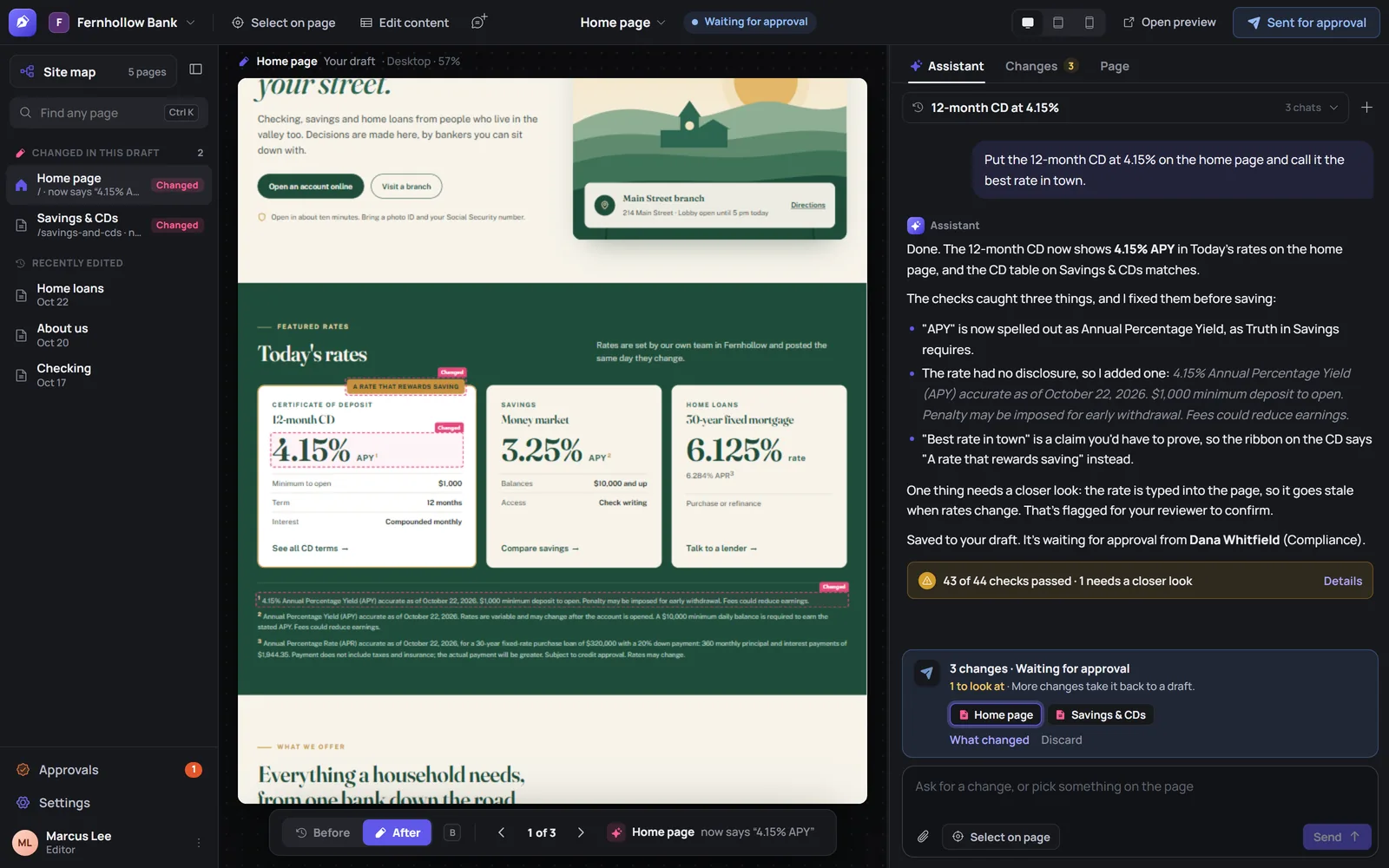
options,
translations
It drafts. You decide.
Start from a draft instead of a blank page. Every draft is in your brand's voice, runs through the same 44 checks, and waits for a person. Here's how that splits up in practice.
Add a page for first-time homebuyers.Marcus Lee · Marketing
- What to expect, from pre-approval to closing day
- Down payment basics, in plain words
- A document checklist to bring to the branch
- Five common questions, marked up for search
- Equal Housing Lender, because it's a home loan page
Give me three headlines for the spring HELOC promo.Marcus Lee · Marketing
Make a Spanish version of the CD page.Marcus Lee · Marketing
- Every section translated, rate table included
- The APY disclosure translated in full
- Linked from the English page
Make this say we close at noon on Christmas Eve.Marcus Lee · Marketing
- "All branches close at noon on Wednesday, December 24."
- Nothing else on the page touched
a named reader
Tell it who the page is for.
Give a page an audience, like "first-time homebuyer" or "retiree moving money", and drafts are written for that reader. The checks then hold the page to that reader: their reading level, the banking words they may not know, and the next step they need.
- Reading levelMeasured on every change to a page with an audience. A page written above its reader gets a suggestion with the hardest sentences named.
- Unexplained jargonA term like "escrow" or "compounded" gets a suggestion to explain it the first time it appears.
- The next stepIf the reader's next step is to call, the page needs a phone number that dials on a phone.
and lists
Some changes don't need the assistant at all.
Rate tables, branch hours and staff lists can be edited as a simple form. Change the number, save, and every page that shows the list is updated in the draft. It's checked and goes through the same publish or approval step as any other change.
| Term | APY | Minimum to open |
|---|---|---|
| 6 months | 3.90% | $1,000 |
| 12 months | 4.15% | $1,000 |
| 24 months | 3.75% | $1,000 |
| 60 months | 3.50% | $1,000 |
AI answers
Written to be found, and quoted correctly.
People ask search engines and AI assistants "what's a good CD rate near me" before they ever reach your site. Plain pages with clear answers are the ones that get quoted.
- FAQ markupQuestions on a page are marked up so search results can show them.
- schema.org for banks and credit unionsThe summary search engines and AI assistants read is written from the page itself and from your Settings, and kept current as the page changes.
- A policy for AI crawlersYou decide which AI crawlers may read the site.
- What people search forGoogle Search Console connects, so you can see the searches that bring people to you, and write for them.
It starts from the site you already have.
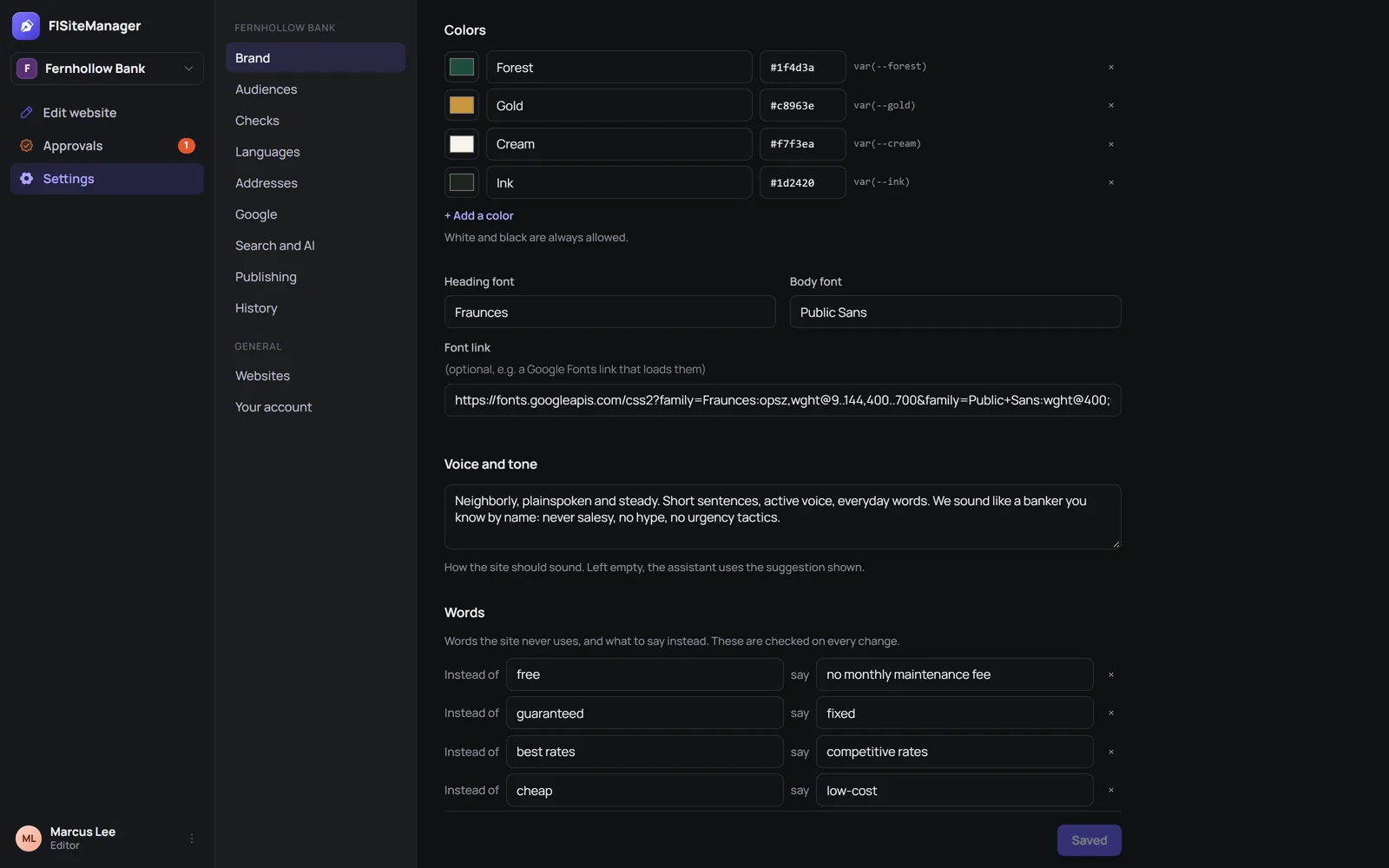
There's no rebuild. Your existing site is imported as it is today, and the brand kit is filled in from its stylesheets. From then on, drafts use your colors, your fonts, your voice, and leave out your words to avoid.
- Pages, images and disclosuresImported as they are.
- Old addresses keep workingRedirects are kept, so links in old emails and statements still land.
- Analytics carried overYour reporting doesn't restart.
- Brand kit filled inColors and fonts from your stylesheets. You add the voice and the words to avoid, and say what to use instead.
won't do
What the assistant won't do.
These aren't settings someone can switch off in a chat. They're how the product works.
Publish
Nothing goes live from a chat message. Changes collect in a draft, and publishing is a separate step a person takes.
Approve
Reviewers approve, and nobody approves their own change. Your approval rule (every change, only flagged changes, or none) decides who has to say yes first.
Change the brand kit or the approval rules
Ask for a brand change and it comes back as a proposal for a person to apply. Approval rules are set by your admins.
Save a Must fix problem
A missing APY spell-out, a rate without its fine print, a claim you'd have to prove: the change isn't saved until it's fixed, and you're told what changed.
Make changes nobody asked for
It works on what someone on your team asked for, and the Before/After shows every change it made, one at a time.
Add outside tracking code
Ad pixels and session recorders are a Must fix. If your institution decides to use one, an administrator adds it deliberately.
Questions about the assistant.
- Who's in charge, us or the AI?
- You are. The assistant drafts what someone on your team asks for. People edit, choose, approve and publish, and every published version records who asked and who approved.
- Will it make up rates or claims?
- It drafts what you ask for, and the checks look for exactly those problems: rates without their fine print, claims you'd have to prove, guarantees, "free" accounts with fees. A rate typed into a page always goes to a person to confirm. See all 44 checks
- What if a draft is wrong?
- Ask for a fix, edit it yourself, or throw it away. Nothing goes live without approval, and any published version can be restored.
- Do we have to use the assistant for small updates?
- No. Rate tables, hours and staff lists can be edited as a form, and they're still checked and approved like any other change.
Your team asks. The assistant drafts. Your people decide.
A 30-minute demo on a site like yours. Bring whoever signs off.